


AI Tools for Audio Editing: How to Choose the Right One for Your Business
You need to produce, edit, translate, or analyze audio faster, but your team still spends hours on manual work. AI audio tools now handle transcription, noise removal, voice generation, dubbing, music creation, and text-based editing. The hard part is choosing one that fits the workflow. Book a call to turn challenges into benefits.
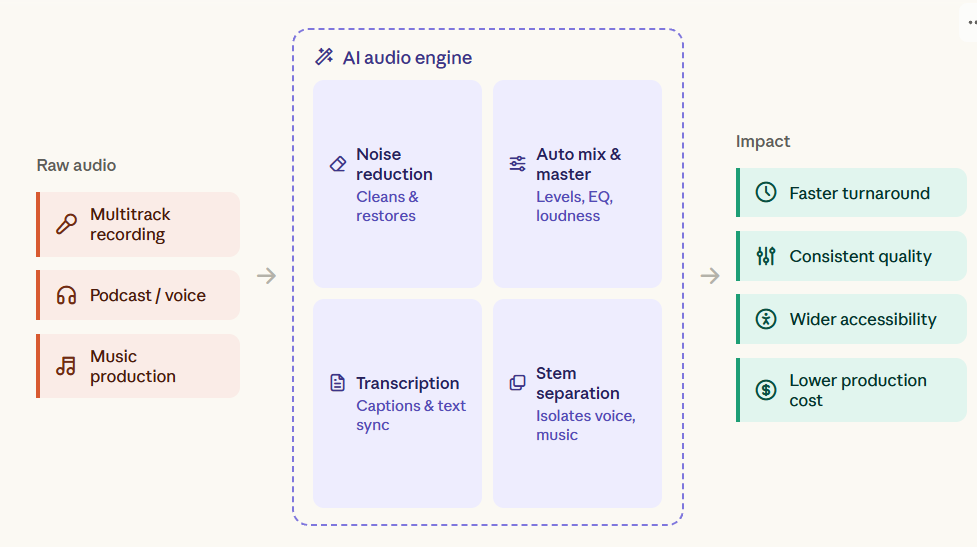
Which Audio Workflows Actually Need AI?
You probably need AI audio software if:
- Editors spend too much time removing silence, filler words, and background noise.
- Your team records the same content in several languages.
- Marketing needs multiple voiceovers or ad variations.
- Podcasts require manual transcription and editing.
- You need synthetic voices for training, presentations, or video.
- Your product needs speech recognition or voice interaction.
- Audio data must be fed into another business system.
These are different problems. One tool rarely handles all of them well.
What AI Audio Software Can Automate
AI audio software usually automates one or more stages of the audio workflow.
Speech-to-text converts recordings into editable text. Descript and Adobe Podcast use this model for transcript-based editing.
Audio enhancement removes noise, balances levels, and cleans recordings. Auphonic focuses on post-production and supports transcription in more than 100 languages.
Voice synthesis converts text into spoken audio. ElevenLabs and Murf focus on generated voices, cloning, dubbing, and multilingual content.
Voice cloning creates speech based on a reference voice. OpenVoice gives developers control over accents, rhythm, pauses, and intonation.
Music generation handles a different task. Suno and Udio create songs, vocals, melodies, and lyrics rather than editing business recordings.
Forbes’ 2026 reporting documents on AI-audio tools use cases: automated recording enhancement (crosstalk removal, denoising, and voice-level balancing); conversion of raw audio into AI-usable metadata such as transcripts, speaker identifiers, and timestamps for search, licensing, and repurposing; synthetic-host radio programming that combines generated voices, scripts, and music selection; and text-prompted music generation with controls for lyrics, timing, instrumentation, and downloadable stems.
Where Audio Production Becomes a Business Cost
Audio production creates repeated manual work.
An editor may clean every recording separately. A marketing team may record the same message for every market. A support team may manually document every call.
At small volumes, this is manageable. At enterprise volume, the workflow itself becomes the cost.
The business impact usually appears in four places:
- Production time: more hours per episode, video, or campaign.
- Labor cost: repetitive editing consumes specialist time.
- Content velocity: localization and versioning take longer.
- Customer experience: slow or inconsistent voice interactions affect service quality.
The right tool reduces one bottleneck. A connected AI workflow can remove several.
How to Find the Bottleneck in Your Audio Workflow
Start with the workflow, not the software.
Map the audio process from recording to final output. Then measure:
- Minutes of manual editing per finished hour.
- Time spent on transcription and proofreading.
- Number of language versions produced each month.
- Cost of voice recording and localization.
- Average processing time per file.
- Error rates in transcription and pronunciation.
- Where audio data must move after processing.
Then match the bottleneck to the tool category.
The original review provides pricing and ratings for these products, but those figures should be rechecked before procurement. If you need an individual approach to a solution, schedule a call.
How to Match the Right AI Audio Tool to the Job
Use a three-step selection process.
- Start with the job. Choose audio editing, transcription, voice generation, dubbing, music creation, or voice interaction.
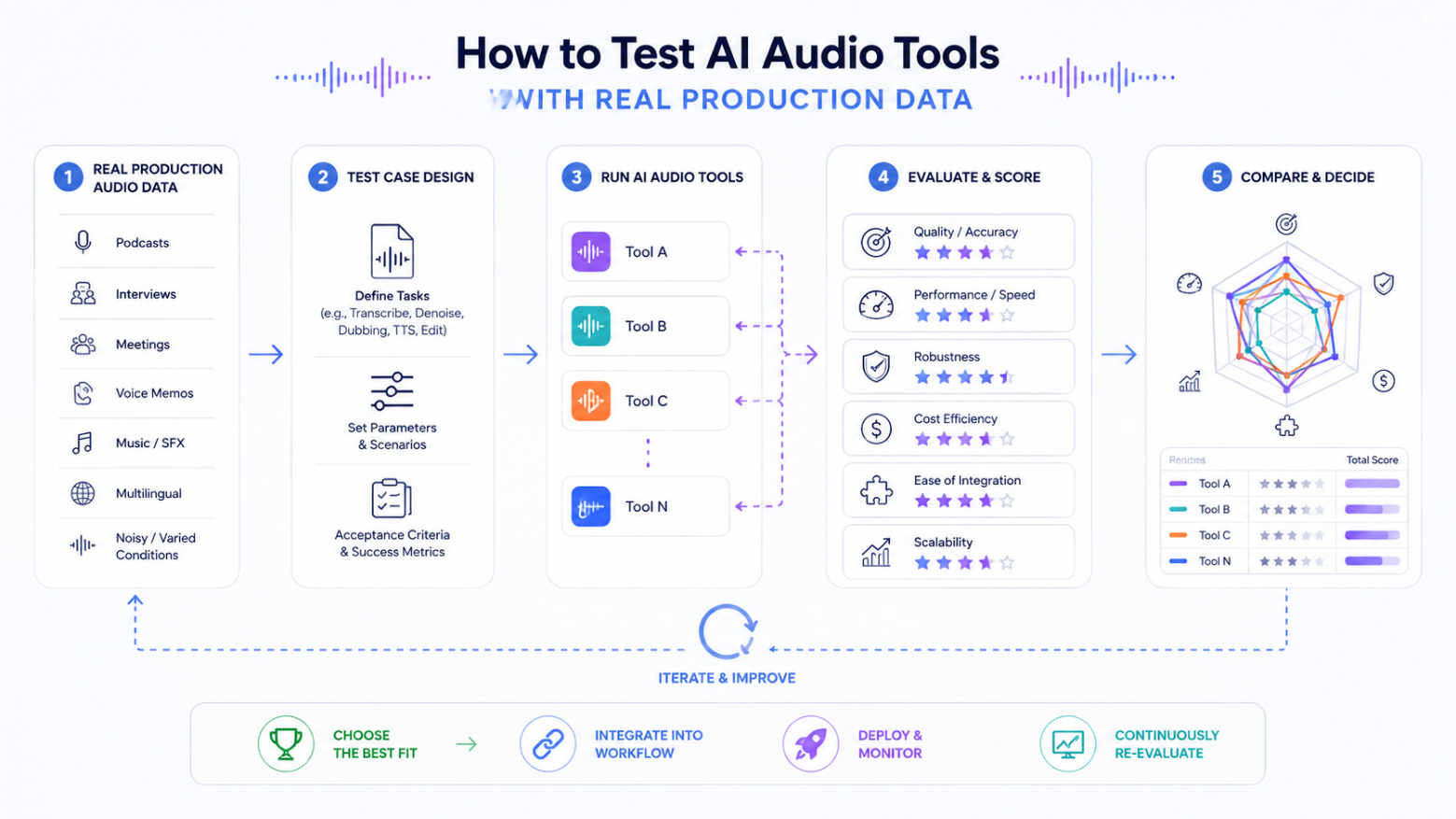
- Test the real input. Do not rely on a polished vendor demo. Upload recordings with background noise, accents, technical vocabulary, long pauses, and real production conditions.
- Measure the result. Compare manual and automated processing time, error rate, output quality, and cost per finished minute.
For example, Descript fits teams that want to edit speech through a transcript. Auphonic fits recurring post-production work: elevenLabs or Murf fit voice generation and localization. OpenVoice is better suited to teams that need deeper technical control.
L.E.K. Consulting: The most productive applications of artificial intelligence (AI) are increasingly those that customers can feel directly. Voice ordering, improved accuracy, more relevant offers, and smoother service recovery all contribute to a better and more consistent experience.
How to Test AI Audio Tools with Real Production Data
A standalone SaaS tool is usually enough for a small content team.
External engineering becomes relevant when audio becomes part of the product or a larger business process.
Typical signals include:
- Audio must connect to CRM, ERP, or internal databases.
- Voice data must pass through custom processing pipelines.
- You need real-time speech recognition.
- Generated audio must follow company-specific rules.
- Several AI models must work within a single workflow.
- Audio processing needs to run at high volume.
- Security or compliance rules limit third-party processing.
At that point, buying another subscription does not solve the architecture problem.
Which Metrics Show Whether AI Audio Is Working
The right metric depends on the workflow.
For content teams, track:
- editing hours saved per episode;
- cost per finished audio hour;
- transcription error rate;
- localization turnaround time.
For voice products, track:
- response latency;
- call containment rate;
- escalation rate;
- conversion rate;
- customer satisfaction.
Where DATAFOREST Fits into an AI Audio Workflow
DATAFOREST can build the layer around the AI audio technology.
- Generative AI can handle voice generation and content creation.
- Data engineering can prepare audio data pipelines and connect processing stages.
- Data science can build models for classification, recommendation, or speech analysis.
- Custom software development can turn these components into an internal product or customer-facing feature.
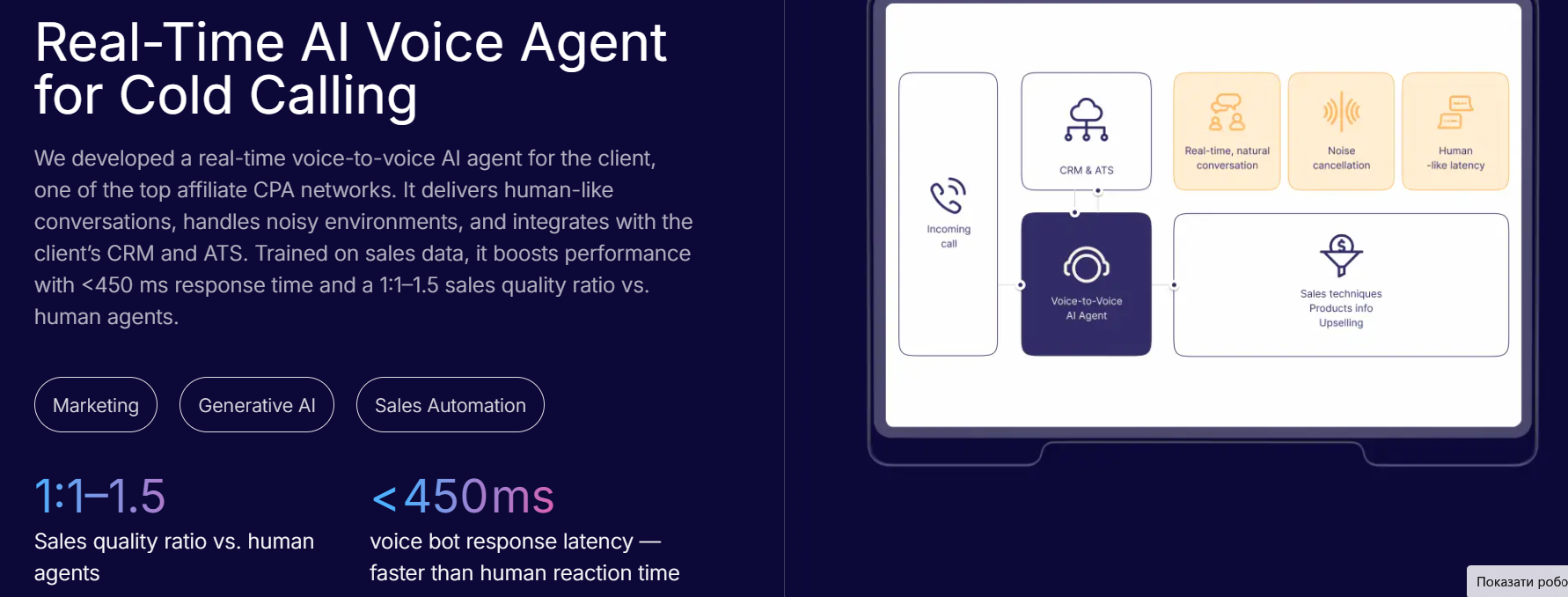
For real-time voice products, DATAFOREST develops AI Voice Agents with speech recognition, model orchestration, CRM integration, and real-time response handling.
Choose the Tool by the Workflow
The best AI audio tool is not the one with the longest feature list.
Start with the business task. Measure the current workflow. Test the tool with real data. Then decide whether you need a standalone product or a custom AI system.
If audio has become a production bottleneck, we can help design the workflow, connect the models, and build the software around them.
Please fill out the form to receive a clear architecture plan and estimated cost savings for your organization.
Questions on AI Tools For Audio
How do AI audio tools handle data privacy, consent, and ownership when processing or cloning people’s voices?
Enterprise audio software stores voice recordings in encrypted databases and isolates user data from public AI training models. Providers mandate verbal consent verification scripts or signed digital agreements before processing vocal samples. Contracts grant full intellectual property ownership of generated voice replicas to paying customers and voice actors.
What are the main limitations of AI-generated audio, such as emotional accuracy, pronunciation, accents, or natural-sounding speech?
Current voice cloning tools lack genuine human emotion in long commercial scripts. The 2026 audio software mispronounces unfamiliar industry terms and regional slang words. Human listeners notice robotic tones, unnatural breath pauses, and mechanical pacing in the final output files.
How should businesses evaluate the ROI of switching from traditional audio production to AI-powered workflows?
Firms compare the hourly rates of human voice actors against monthly software subscription fees. Managers track the exact minutes saved during daily audio editing tasks. Finance teams measure new sales revenue from translated foreign language campaigns.
What technical requirements, such as APIs, cloud infrastructure, storage, or computing resources, are needed to deploy AI audio tools at enterprise scale?
Enterprise deployments require NVIDIA GPUs like the RTX 5090 or H100 with high memory capacity. The cloud architecture features AES-256 encrypted storage for audio recordings and managed application programming interfaces. The complete software system combines automatic speech recognition, large language models, and text synthesis engines.
How do AI audio tools compare in accessibility and usability for non-technical users versus professional audio engineers and developers?
Non-technical users experience excellent usability through simple web dashboards and basic text prompts. Professional sound developers process complex digital signals with the JUCE C++ software. Audio experts prevent dangerous software glitches with exact custom code during live performances.

.svg)
.webp)
.webp)
.webp)


